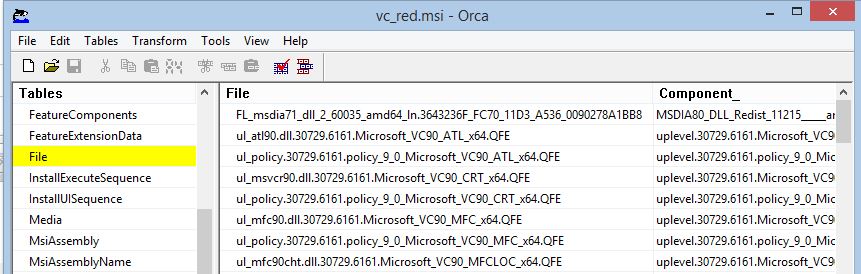
Resolving file paths within MSI databases can be a complex piece of coding. It involves linking files to components and components to the directory table. The complexity is due to the flexibility of Windows Installer in determining how directory table entries are referenced.
The directory table of Windows Installer databases uses chained entries to construct a resultant target path for directories. These directory chains can be altered by custom actions and DOS environment variables.
The script below is an example of how to resolve files from within an MSI to the actual paths from which the file can be expected to be installed.
Using the Script
The header of the script allows for specifying the path to an MSI, the path to the text based report that is to be generated and (if required) a Transform that can be used with the specified MSI. The script resolves files within an MSI to a true path and can be modified to also list file versions, file sizes or file hashes. These properties need to be set before the example can be used.
The script is part of an "MSI Check" utility that I wrote many years ago for creating Infopath based QA documents for Windows Installer packages. Feel free to download the entire set of scripts from the link mentioned.
[[vb]]

'****************************************
'Declare variables
'****************************************
Const HKEY_CURRENT_USER   = &H80000001
const HKEY_LOCAL_MACHINE  = &H80000002

'****************************************
' Set Reporing Properties
'****************************************
'Set the name and path of the MSI file that is to be queried
strMsiFile        = "H:\vc_red.msi"

'If a transform is being used, specify that location
strTransformFile  = ""

'Set the output report location
strReportlocation = "H:\MSIReport.xml"


'****************************************
' Set Objects
'****************************************

Set objShell      = CreateObject("WScript.Shell")
set objFSO        = CreateObject("scripting.FileSystemObject")
Set Installer     =	CreateObject("WindowsInstaller.installer")

set outfile       =	objFSO.OpenTextFile(strReportlocation, 8,True,-1) 'open for append
Set Database      =	Installer.OpenDatabase(strMsiFile, 0)


If Not strTransformFile ="" Then
	Database.ApplyTransform strTransformFile, 0
End if

'****************************************
'Script
'****************************************

'we have to be sure that there is a File table within the MSI.
if DoesTableExist("File") = False then
	message = message &"This database does not contain any files" &chr(13) &chr(10)
	ScriptResult = "Pass"
	cleanup
	Wscript.quit
end if

'Methodology
'Correctly interpreting Directory structures is complex due to teh flexibility of Windows Installer
'Major complexities occur with:
' * Custom Actions being used to set directories via properties
' * Properties being used to specify directory names and locations
' * MS visual Studio packages that do not have INSTALLDIR references ' * CSDIL directory references
' * NO-OPS dirs that dont actually a directory name
'This is a long and confusing script - for ease of understanding it's broken into staged categories
'that occur sequentially:
' 1. Custom Actions - determine properties set by Custom Actions & verifying they are part of the InstallExecute Sequence
' 2. Directory Table - establishing a table in memory to link directories with actual names
' 3. CSIDL Dir & Longname Resolution - Resolving CSIDL directories and proper 32bit long names
' 4. Apply Custom Actions Changes - Resolving all changes made by Custom Actions to the Directory Table
' 5. Apply Custom Actions Changes #2 - mostly redundant code... more testing is required
' 6. Apply the Property table Changes
' 7. Link Directories - Create the full directory chains
' 8. Directories set as other Directory References - a really nasty thing to do but it's found.
' 9. Resolve DOS ENV directory References (DOS Environment variables used within Directories
' 10. Clean NO Ops Dir References
' 11. Property Hardcoding Resolution - probably redundant code... left for an opportunity to refine and test
'The difficulty of determining the Directory table is complete - the remaining tasks link files to directories
' 12. Link Files & Components via a Dictionary
' 13. Create a file array for resolving all files to respective directory paths
' 14. Bubble Sort resultant File Paths

'*************************
'Custom Actions
'*************************
'Lets find out how many custom actions are involved in setting directories

Type5lcount=0

if DoesTableExist("CustomAction") = True then
	'We know there are custom actions but are there custom actions of type 51?
	' Recursively list the entries within the Custom Actions Table
	Set View =	DataBase.OpenView("SELECT * FROM CustomAction")
	View.execute
	Set record = view.Fetch
	While Not (record Is Nothing)
		if Record.StringData(2)=51 or Record.StringData(2)=307 then
			Type5lcount=Type5lcount+1
		end if
		Set record = view.Fetch
	Wend
end if


'If Type 51 Custom Actions exist we'll need to create an array of their values
if Type5lcount > 0 then
	redim Type5lArray(Type5lcount,3)
	' Recursively list the entries within the Custom Actions Table 'And populate the created array
	Type5lcount=0
	Set View =	DataBase.OpenView("SELECT * FROM CustomAction")
	View.execute

	Set record = view.Fetch
	While Not (record Is Nothing)
	if Record.StringData(2)=51 or Record.StringData(2)=307 then
		Type5lArray(Type5lcount,1) = Record.StringData(3) 'Source
		Type5lArray(Type5lcount,2) = Record.StringData(4) 'Target
		Type5lcount=Type5lcount+1
	end if
	Set record = view.Fetch
	wend
end if

'within out type51 array we have to recursively look for each property
'as MSI's are installed silently we dont want to include logic that does not occur under
'the InstallExecutesequence

if isarray(Type5lArray) then
	for x = 0 to ubound(Type5lArray)
		'msgbox "current = " &x &"action =" &Type5lArray(x,1)
		Set view =	DataBase.OpenView("SELECT * FROM InstallExecuteSequence WHERE Action ='" &Type5lArray(x,1) &"'")
		View.execute
		Set record = view.Fetch
		if Not (record Is Nothing) then
			Type5lArray(x,3) = 1
		end if
	next
end if


'Directory Table
Set View =	DataBase.OpenView("SELECT * FROM Directory")
View.execute
Set record = view.Fetch
' Recursively list the entries within the Table DirectoryCount-0
While Not (record Is Nothing)
	DirectoryCount=DirectoryCount+1
	Set record = view.Fetch
wend

DirectoryCount=DirectoryCount-1

'we know the number of entries within the array ' we have to declare our array now
redim DirArray(DirectoryCount,7)
'We can now populate the array
DirectoryCount=0

Set record = view.Fetch
While Not (record Is Nothing)
	DirArray(DirectoryCount,1)= Record.StringData(1) 'DirectoryName
	DirArray(DirectoryCount,2)= Record.StringData(2) 'Directory parent

	'Make an adjustment for TargetDir
	If not Record.StringData(1) = "TARGETDIR" then
		DirArray(DirectoryCount,3)= longname(Record.StringData(3)) 'DefaultDir
		DirArray(DirectoryCount,5)= Record.StringData(2) 'Next Parent
		DirArray(DirectoryCount,6)= longname(Record.StringData(3)) 'Readablename 'Only targetdir is resolved
		DirArray(DirectoryCount,7)= longname(Record.StringData(3)) 'DefaultDirname - not to be altered
	end if
	If Record.StringData(2) = "" then
		DirArray(DirectoryCount,4)= "1" 'IsResolved 'targetDir is itself resolved
	end if
	DirectoryCount=DirectoryCount+1
	Set record = view.Fetch
wend
DirectoryCount=DirectoryCount-1 'troubleshoot


'CSIDL Dir & Longname Resolution
'SourceDir targetdir - DefaultDir name resolution
'Anything that contains a colon in the Default Dir column states that the source of the files for that
'directory come from a different folder structure. The Source is not what we are interested in
'so to resolve directory names correctly, we remove anything that comes after (and including) the colon

for x = 1 to ubound(dirarray)
	if instr(DirArray(x,3),":") >0 then
		DirArray(x,3) = left(DirArray(x,3),instr(DirArray(x,3),":") -1)
	end if
next

For x = 0 to DirectoryCount
	If DirArray(x,1)="TARGETDIR" then
	'Packages without INSTALLDIR are resolved via TARGETDIR
		if CATargetDir = Nul then
			DirArray(x,6) = "C:\"
			DirArray(x,3) = "C:\"
			DirArray(x,4) = "1" 'IsResolved
		else
			DirArray(x,6) = CATargetDir
			DirArray(x,3) = CATargetDir
			DirArray(x,4) = "1" 'IsResolved
		end if
	end if


	If DirArray(x,2)="TARGETDIR" then 'test to see if a CSIDL directory exists 'because of Merge modules we have to parse & split directory names at a period
		TempDir=""
		if instr(DirArray(x,1),".") >0 then
			tempdirarray=split(DirArray(x,1),".")
			TempDir =tempdirarray(0)
		else
			TempDir = DirArray(x,1)
		end if
		'The Tempdir variable will be set for checking resolution

		'The parsed directory name must now be checked against the CSIDL list 'If CSIDL is not detected the original string is returned.
		if not ResolveDirName( "[" &TempDir &"]") = "[" &TempDir &"]" then
			DirArray(x,6) = ResolveDirName( "[" &TempDir &"]")
			DirArray(x,3) = ResolveDirName( "[" &TempDir &"]")
			DirArray(x,4) = 1	'Directory is resolved
		end if
	end if


next

'Apply Custom Actions Changes
For x = 0 to DirectoryCount
	'we insert Logic for directories being hard set through Custom Actions
	'This is done after other logic as the values for these directories are being
	'Hard Set, regardless of MSI Rules
	if Type5lCount > 0 then
		for y = 0 to Type51Count
			if DirArray(x,1) = Type5lArray(y,l) AND Type5lArray(y,3) = 1 then
				'we have a directory being Hardcoded through Type 51 Custom Actions DirArray(x,2)= "" 'No directory parent if resolved by Custom Action
				DirArray(x,4)= "1" 'IsResolved
				varTemp=Type5lArray(y,2)
				DirArray(x,3)= ResolveDirName(varTemp)
				DirArray(x,6)= ResolveDirName(varTemp)
				y = Type5lCount
			end if
		next
	end if
next

'Custom Action properties can also be used as part of destination strings for directories
'Any Type 51 properties need to be set
For x = 0 to DirectoryCount
	if Type5lCount > 0 then
		for y = 0 to Type5lCount
			DirArray(x,6) = Replace (DirArray(x,6),"[" & Type5lArray(y,l) &"]" , Type5lArray(y,2))
			DirArray(x,3) = Replace (DirArray(x,3),"[" & Type5lArray(y,l) &"]" , Type5lArray(y,2))
		next
	end if
next

'Apply Custom Actions Changes #2
'just when you thought there couldn't possibly be any more to deal with 'We find more potental uses for Type 51 Custom Actions
for x= 0 to ubound(dirarray)
if instr(DirArray(x,6),"[") > 0 then 'we need to check the Type 51 Custom Actions
	for y = 0 to Ubound(Type5lArray)
		'would you believe we have to do this twice due to one really crappy pckage!
		if instr(DirArray(x,6),"[" &Type5lArray(y,l) &"]") > 0 AND Type5lArray(y,3) = 1 then' this directory references a second directory\
			DirArray(x,6) = Replace(DirArray(x,6),"[" &Type5lArray(y,l) &"]",Type5lArray(y,2) &"\",1,-1,VbTextCompare)
			DirArray(x,3) = Replace(DirArray(x,3),"[" &Type5lArray(y,l) &"]",Type5lArray(y,2) &"\",1,-1,VbTextCompare)
		end if
		if instr(DirArray(x,6),"[" &Type5lArray(y,l) &"]") > 0 AND Type5lArray(y,3) = 1 then' this directory references a second directory\
			DirArray(x,6) = Replace(DirArray(x,6),"[" &Type5lArray(y,l) &"]",Type5lArray(y,2) &"\",l,-l,VbTextCompare)
			DirArray(x,6) = Replace(DirArray(x,6),"[" &Type5lArray(y,l) &"]",Type5lArray(y,2) &"\",l,-l,VbTextCompare)
		end if
	Next
end if
next

'oh the never ending variance of ways to set a directory 'This is very unusual
for x= 0 to ubound(dirarray)
	tempstring=""
	for y = 1 to 5
		if tempstring ="" then
			tempstring =DirArray(x,6)
		else
		end if
		if instr(tempstring,"[") > 0 and instr(tempstring,"]") > 0 then
			tempstring=right(tempstring,len(tempstring) - instr(tempstring,"[") + 1)
			tempstringright=tempstring 'we'll save this for later
			tempstring=left(tempstring,instr(tempstring,"]"))
			'the tempstring is now a property - we need to compare that property to the directory table
			'and to the Property table
			if instr(ResolveDirName(tempstring),"c:\") > 0 then
				DirArray(x,4) = 1	'Directory is resolved
				DirArray(x,6) = Replace (DirArray(x,6),tempstring,ResolveDirName(tempstring) &"\",1,-1,vbTextcompare)
			end if
			'the ResolveDirname always references C:\
			tempstring = right(tempstringright,len(tempstringright)-len(tempstring))
		else
			Y=5
		end if
	next
next


'Apply Property Table Changes
'We must also account for directories that are having their Paths directly set through the Property table
'we will run an sql query against the entries of the property table to see if they contain driver references
'if so, stamp their value against the directory table
'we have to be sure that there is a File table within the MSI.

Set View =	DataBase.OpenView("SELECT * FROM Property")
View.execute
Set record = view.Fetch
While Not (record Is Nothing)
	If instr(Record.StringData(2), ":\") > 0 then
	'This particular property is being hardcoded - we need
		For x = 0 to ubound(DirArray)
			if Record.StringData(1) = DirArray(x,1) then 'the property is setting this directory location
				DirArray(x,6) = Record.StringData(2)
				DirArray(x,3) = Record.StringData(2)
				DirArray(x,4) = 1	'Directory is resolved
				x = ubound(DirArray)
			end if
		next
	end if
	Set record = view.Fetch
wend

'of course the Property table can be used to just set directory names - we should take them into account
Set view =	DataBase.OpenView("SELECT * FROM Property")
view.execute
set record = view.Fetch
while Not (record Is Nothing)
'This particular property is being hardcoded - we need to check against our directory table
For x = 0 to ubound(DirArray)
	if instr(DirArray(x,6), "[" &Record.stringData(1) &"]" ) > 0 then
		DirArray(x,6) = Replace (DirArray(x,6),"[" &Record.StringData(1) &"]",Record.stringData(2),1,-1,vbTextcompare)
	end if
next
set record = view.Fetch
wend


'*************************
'Link Directories
'*************************
'Our DirArray contains the names of every entry from the directory table
'we need to recursively reference these tables until we can resolve a full path 'A directory chain is fully resolved once the Directory Parent to a Directory chain is'set to TARGETDIR
'Code rework will be needed later to resolve this.
'troubleshoot

For x = 0 to ubound(DirArray)

'	msgbox x &" of " &ubound(DirArray)'
'	msgbox  Ucase(DirArray(x,5))
'	troubleshoot
	'do this for each directory entry in our array
	isresolved=0
	noparent=0
	do until isresolved = 1 or noparent=1
		'make sure that every directory is resolved
		'as a sanity check - if a drive reference exists dont ty to resolve any further
		if instr(DirArray(x,6),":\") > 1 then
			isresolved = 1
			Exit DO
		end if
		'The fourth field in the table is set to 1 when the directory is resolved
		if DirArray(x,4)= "1" then
			isresolved = 1
			Exit DO
		else
			'the directory is not resolved... we need to find the next parent within the array
			For z = 0 to ubound(DirArray) 'Find the next parent of the problem directory
			'troubleshoot
			'msgbox DirArray(z,1)
				if Ucase(DirArray(x,5)) = Ucase(DirArray(z,1)) then 'we have found the Next Parent
					DirArray(x,5) = DirArray(z,5)

					If DirArray(z,4) = "1" then
						'the parent is resolved so we add it to the readable directory chain
						DirArray(x,6)= DirArray(z,6) &"\" &DirArray(x,6)
						'and indicate that our directory is now resolved as well.
						DirArray(x,4) = "1"
						isresolved =1
						exit do
					else
						'add the parent directory to the chain & set the new parent to be that former grandparent
						DirArray(x,6)= DirArray(z,3) &"\" &DirArray(x,6)
						DirArray(x,5) = DirArray(z,5)
						z = ubound(dirarray)
					end if
				end if
			next
		end if
	loop
next


'Directories set as other Directory References
'There are situations where Custom Actions set a directory path to be that of another
'property in the Directory table... this shouldn't be done but a number
'of Microsoft packages do this.
'We do one more sweep of the table to see if Resolved directories are referencing another
'Directory property

For z = 0 to ubound(dirarray)
	if instr(DirArray(z,6),"[")= 1 then 'we have an unresolved directory referencing a Property
		for y = 0 to ubound(dirarray)
			if instr(DirArray(z,6),"[" &DirArray(y,1) &"]") =1 then' this directory references a second directory
				DirArray(z,6) = Replace(DirArray(z,6),"[" &DirArray(y,1) &"]",DirArray(y,6) &"\",1,-1,VbTextCompare)
				y = DirectoryCount
			end if
		next
	end if
next

'*************************
'Resolve DOS ENV directory References
'*************************


for x = 0 to ubound(DirArray)
	'msgbox DirArray(x,6)
	DirArray(x,6) = Replace(DirArray(x,6),"[%AllUsersProfile]","C:\Documents and Settings\All Users",1,-1,VbTextCompare)
	DirArray(x,6) = Replace(DirArray(x,6),"[%AppData]","C:\Documents and Settings\Username\Application Data",1,-1,VbTextCompare)
	DirArray(x,6) = Replace(DirArray(x,6),"[%CommonProgramFiles]","C:\Program Files\Common Files",1,-1,VbTextCompare)
	DirArray(x,6) = Replace(DirArray(x,6),"[%ProgramFiles]","C:\Program Files",1,-1,VbTextCompare)
	DirArray(x,6) = Replace(DirArray(x,6),"[%SystemDrive]","C:\",1,-1,VbTextCompare)
	DirArray(x,6) = Replace(DirArray(x,6),"[%SystemRoot]","C:\Windows",1,-1,VbTextCompare)
	DirArray(x,6) = Replace(DirArray(x,6),"[%Temp]","C:\Documents and Settings\username\Local Settings\Temp",1,-1,VbTextCompare)
	DirArray(x,6) = Replace(DirArray(x,6),"[%UserProfile]","C:\Documents and Settings\Username",1,-1,VbTextCompare)

next

'Add trailing backslashes to directory references as per MSI standards
For x = 0 to ubound(dirarray)
if not instrrev(DirArray(x,6),"\") = len(DirArray(x,6)) then 'add a backslash
	DirArray(x,6) = DirArray(x,6) &"\"
end if
next

'*************************
'Clean NO Ops Dir References
'*************************
For x = 0 to ubound(dirarray)
	'The only other thing needed to be purged are double backslashes & no op dirs
	do until instr(DirArray(x,6),"\.")=0
		DirArray(x,6) = Replace(DirArray(x,6),"\.","\")
	Loop
	do until instr(DirArray(x,6),".\")=0
		DirArray(x,6) = Replace(DirArray(x,6),".\","\")
	Loop
	do until instr(DirArray(x,6),"\\")=0
		DirArray(x,6) = Replace(DirArray(x,6),"\\","\")
	Loop
	if instr(DirArray(x,6),"\") = 1 then
		DirArray(x,6)= right(DirArray(x,6),len(DirArray(x,6))-1)
	end if
Next

'*************************
'Property Hardcoding Resolution
'*************************
'We have to again look at the property table for hardcoded values 'let's create a dictionary to hold property values

Set View = DataBase.OpenView("SELECT * FROM Property")
View.execute
Set record = view.Fetch
while Not (record Is Nothing)
For x = 0 to ubound(dirarray) 'look at each directory we have
	if instr(DirArray(x,6),"[" &Record.StringData(1) &"]") = 1 then 'we have a property that's been hard set.
		'Finally check properties against all of our directory entries
		DirArray(x,6) = Replace(DirArray(x,6),"[" &Record.StringData(1) &"]",Record.StringData(2),1,-1,VbTextCompare)
	end if
next
Set record = view.Fetch
Wend
For x = 0 to ubound(dirarray)
	'all directories should now be resolved to a drive or a property in the case of Appsearch
	if instr(DirArray(x,6),":\") = 2 OR instr(DirArray(x,6),"[") = 1 then 'the directory is resolved
	else
	'we assume the Rootdrive will be C:\
		DirArray(x,6) = "C:\" &DirArray(x,6)
	end if
next

'Directory Resolution is complete... now we link files to Directories via the Component tabl references
'***********************
'Link Files & Components via a Dictionary
'***********************
'The first step is to take all the directory paths and link them to components 'The components can then link file names to give an absolute reference
'We will then have an array listing the fullfilename of every directory and 'file within the package
'We'll create an array of the file table where we can list the InternalMSlFilename with the
'Component and absoute path of the component
'Create a dictionary of File resolution
Set Directorylist = CreateObject("Scripting.Dictionary")
For x = 0 to DirectoryCount
	Directorylist.Add DirArray(x,1) , DirArray(x,6)
Next

Dim FileComponent
Set FileComponent = CreateObject("Scripting.Dictionary")
Set View =	DataBase.OpenView("SELECT * FROM Component")
View.execute
Set record = view.Fetch
While Not (record Is Nothing)
	'Add to the dictionary the list of components - Directory locations
	FileComponent.Add Record.StringData(1), Record.StringData(3) 'Component
	Set record = view.Fetch
Wend

'***********************
'Create a file array for resolving all files to respective directory paths
'***********************

'Set a counter for the numberof files Filecount=0
Set View =	DataBase.OpenView("SELECT * FROM File")
View.execute
Set record = view.Fetch
while Not (record Is Nothing)
	Filecount=Filecount+1
	Set record = view.Fetch
	Wend
	redim FileArray(Filecount-1,3)
	' Recursively list the entries within the Custom Actions Table 'And populate the created array
	Filecount=0
	Set View =	DataBase.OpenView("SELECT * FROM File")
	View.execute
	Set record = view.Fetch
	while Not (record Is Nothing)
		FileArray(Filecount,1)= Record.StringData(1) 'Internal MSI Filename
		FileArray(Filecount,2)= Directorylist.Item(FileComponent.Item(Record.StringData(2))) & longname(Record.StringData(3)) 'taking component name & translating it to a directory reference
		FileArray(Filecount,3)= longname(Record.StringData(3)) 'filename
		Filecount=Filecount+1
		Set record = view.Fetch
	wend
		'Bubble Sort resultant File Paths
		'Up to this point, every check has been to determine where files get installed to
		'Now we check to see if any of the files are a problem
		'lets attempt to modify Bubble sort to order the array
		'Bubble Sort... Thanks to Richard Lowe for the code
		for i = uBound(FileArray) - 1 TO 0 Step -1
			for j= 0 to i
				if FileArray(j,2)>FileArray(j+1,2) then
					temp=  FileArray(j+1,2)
					temp2= FileArray(j+1,1)
					temp3= FileArray(j+1,2)
					FileArray(j+1,2)=FileArray(j,2)
					FileArray(j+1,1)=FileArray(j,1)
					FileArray(j+1,3)=FileArray(j,3)
					FileArray(j,2)=temp
					FileArray(j,1)=temp2
					FileArray(j,3)=temp3
				end if
			next
		next

	'validation Check
	for x = 0 to ubound(FileArray)
		message=message &FileArray(x,2) &chr(13) &chr(10)
	next
	ScriptResult = "Info"


'****************************************
'Cleanup
'****************************************

Results
Cleanup

'****************************************
'Functions and Subs
'****************************************
sub Results
	outfile.writeline( "")
	outfile.writeline( "" &Message &"")
	outfile.writeline( "")
	outfile.writeline( "")
	outfile.close
end sub

function DoesTableExist(strTableName)
	Set View =	DataBase.Openview("SELECT * FROM _Tables")
	view.execute
	Set record = view.Fetch

	tablefound=0
	While Not (record Is Nothing) and tablefound=0
		if Record.Stringdata(1) = strTableName then
			tablefound=1
		end if
		Set record = view.Fetch
	wend
	if tablefound=0 then
		DoesTableExist=False
	else
		DoesTableExist=True
	end if
end function

function MakeSafe(tempstring)
	tempstring = Replace (tempstring,">",">")
	tempstring = Replace (tempstring,"","")
	tempstring = Replace (tempstring,"&","&")
	tempstring = Replace (tempstring,"'","'")
	tempstring = Replace (tempstring,chr(34),""")
	MakeSafe = tempstring
end function

sub Cleanup
	'Set Objects to Nothing
	Set objShell =	Nothing
	Set wshNetwork 	= Nothing
	Set Installer 	= Nothing
	Set View 		= Nothing
	set Record 		= Nothing
End Sub


'********************************
'Routine for returning a 32bit filename

function longname(Tempvar)
Tempprefix=0
if instr(Tempvar,".:") =1 then
	Tempvar = right(Tempvar,len(Tempvar)-2)
end if

if instr(Tempvar,":") >0 then
	Tempvar = left(Tempvar,instr(Tempvar,":") -1)
end if

'Take care of null ops dirs
if Tempvar ="." then
	longname = ""
end if

If instr(Tempvar,"|") then
	'The string contains long and short names
	Tempvar=right(tempvar, len(tempvar) - instr(tempvar,"|"))
	If Tempprefix=1 then
		Tempvar = ".:" &Tempvar
	end if
end if

longname = Tempvar
End function

' ************* Routine for resolving CSIDL directory locations
Function ResolveDirName(TempDirVar)

dim ResolvedDirLocation
varOriginalReference = TempDirVar
if not instr(TempDirVar,"[") = 1 then
	TempDirVar ="[" &TempDirVar &"]"
end if

ResolvedDirLocation=""
If TempDirVar = "[AppDataFolder]" then ResolvedDirLocation = "C:\Documents and Settings\Username\Application Data" end if
If TempDirVar = "[AllUsersFolder]" then ResolvedDirLocation = "C:\Documents and Settings\All Users" end if
If TempDirVar = "[AllUsersProfile]" then ResolvedDirLocation = "C:\Documents and Settings\All Users" end if
If TempDirvar = "[AllUsersProfileFolder]" then ResolvedDirLocation = "C:\Documents and Settings\All Users" end if
If TempDirvar = "[AdminTools]" then ResolvedDirLocation = "C:\Documents and Settings\All Users\Start Menu\Programs\Administrative Tools" end if
If TempDirvar = "[AdminToolsFolder]" then ResolvedDirLocation = "C:\Documents and Settings\All Users\Start Menu\Programs\Administrative Tools" end if
If TempDirvar = "[Common64]" then ResolvedDirLocation = "C:\Program Files\Common Files" end if
If TempDirvar = "[Common64folder]" then ResolvedDirLocation = "C:\Program Files\Common Files" end if
If TempDirvar = "[CommonAppData]" then ResolvedDirLocation = "C:\Documents and Settings\All Users\Application Data" end if
If TempDirvar = "[CommonAppDataFolder]" then ResolvedDirLocation = "C:\Program Files\common Files" end if
If TempDirvar = "[Common]" then ResolvedDirLocation = "C:\Program Files\Common Files" end if
If TempDirvar = "[CommonFilesFolder]" then ResolvedDirLocation = "C:\Program Files\Common Files" end if
If TempDirvar = "[CommonFiles64Folder]" then ResolvedDirLocation = "C:\Program Files\common Files" end if
If TempDirvar = "[Desktop]" then ResolvedDirLocation = "C:\Documents and settings\Username\Desktop" end if
If TempDirvar = "[DesktopFolder] " then ResolvedDirLocation = "C:\Documents and settings\Username\Desktop" end if
If TempDirvar = "[Favorites]" then ResolvedDirLocation = "C:\Documents and Settings\All Users\Favorites" end if
If TempDirvar = "[FavoritesFolder]" then ResolvedDirLocation = "C:\Documents and Settings\All User\Favorites" end if
If TempDirVar = "[Fonts]" then ResolvedDirLocation = "C:\WINDOWS\Fonts" end if
If TempDirVar = "[FontsFolder]" then ResolvedDirLocation = "C:\WINDOWS\ Fonts" end if
If TempDirvar = "[GlobalAssemblyCache]" then ResolvedDirLocation = "C:\WINDOWS\Assembly" end if
If TempDirvar = "[GAC]" then ResolvedDirLocation = "C:\WINDOWS\Assembly" end if
If TempDirvar = "[LocalAppData]" then ResolvedDirLocation = "C:\Documents and Settings\Username\Application Data" end if
If TempDirvar = "[LocalAppDataFolder]" then ResolvedDirLocation = "C:\Documents and Settings\Username\Local Settings\Application Data" end if
If TempDirvar = "[Personal Folder]" then ResolvedDirLocation = "C:\Documents and settings\Username\My Documents" end if
If TempDirVar = "[MyPictures]" then ResolvedDirLocation = "C:\Documents and Setti ngs\Username\My Documents\My Pictures" end if
If TempDirvar = "[MyPicturesFolder] " then ResolvedDirLocation = "C:\Documents and Settings\Username\My Documents\My Pictures" end if
If TempDirvar = "[Program Files]" then ResolvedDirLocation = "C:\Program Files" end if
If TempDirvar = "[ProgramFilesFolder]" then ResolvedDirLocation = "C:\Program Files" end if
If TempDirvar = "[Personal]" then ResolvedDirLocation = "C:\Documents and Setti ngs\username\My Documents" end if
If TempDirvar = "[Personal folder]" then ResolvedDirLocation = "C:\Documents and settings\username\My Documents" end if
If TempDirVar = "[PrimaryVolumePath]" then ResolvedDirLocation = "C:" end if
If TempDirvar = "[ProgramFiles64]" then ResolvedDirLocation = "C:\Program Files" end if
If TempDirvar = "[ProgramFiles64Folder]" then ResolvedDirLocation = "C:\Program Files" end if
If TempDirvar = "[Programs]" then ResolvedDirLocation = "C:\Documents and Setti ngs\Al 1 Users\Start Menu\Programs" end if
If TempDirvar = "[ProgramsFolder]" then ResolvedDirLocation = "C:\Documents and Settings\All Users\Start Menu\Programs" end if
If TempDirVar = "[ProgramMenuFolder]" then ResolvedDirLocation = "C:\Documents and Settings\All Users\Start Menu\Programs" end if
If TempDirvar = "[Recent]" then ResolvedDirLocation = "C:\Documents and settings\Username\Recent" end if
If TempDirvar = "[RecentFolder]" then ResolvedDirLocation = "C:\Documents and Settings\Username\Recent" end if
If TempDirvar = "[Start Menu]" then ResolvedDirLocation = "C:\Documents and Settings\All Users\Start Menu" end if
If TempDirvar = "[StartMenuFolder]" then ResolvedDirLocation = "C:\Documents and Settings\All Users\Start Menu" end if
If TempDirvar = "[SendTo]" then ResolvedDirLocation = "C:\Documents and settings\username\SendTo" end if
If TempDirVar = "[SendToFolder]" then ResolvedDirLocation = "C:\Documents and settings\username\SendTo" end if
If TempDirVar = "[ShellNew]" then ResolvedDirLocation = "C:\Windows\ShellNew" end if
If TempDirVar = "[ShellNewFolder]" then ResolvedDirLocation = "C:\Windows\ShellNew" end if
If TempDirVar = "[Startup]" then ResolvedDirLocation = "C:\Documents and settings\All users\Start menu\Programs\Startup" end if
If TempDirvar = "[StartUpfolder]" then ResolvedDirLocation = "C:\Documents and Settings\A11 Users\Start Menu\Programs\Startup" end if
If TempDirVar = "[systeml6folder]" then ResolvedDirLocation ="C:\Windows\System" end if
If TempDirVar = "[System32]" then ResolvedDirLocation = "C:\Windows\System32" end if
If TempDirVar = "[System32Folder]" then ResolvedDirLocation = "C:\Windows\System32" end if
If TempDirvar = "[System64]" then ResolvedDirLocation = "C:\Windows\System64" end if
If TempDirVar = "[system64folder]" then ResolvedDirLocation = "C:\Windows\System64" end if
If TempDirVar = "[System]" then ResolvedDirLocation = "C:\windows\System" end if
If TempDirVar = "[SystemFolder]" then ResolvedDirLocation = "C:\Windows\System32" end if
If TempDirvar = "[SYSTemp]" then ResolvedDirLocation = "C:\Documents and settings\username\Local Settings\Temp" end if
If TempDirVar = "[Temp]" then ResolvedDirLocation = "C:\Documents and Settings\username\Local Settings\Temp" end if
If TempDirVar = "[TempFolder]" then ResolvedDirLocation = "C:\Documents and settings\username\Local Settings\Temp" end if
If TempDirvar = "[TemplateFolder]" then ResolvedDirLocation = "C:\Windows\Templates" end if
If TempDirvar = "[UserProfile]" then ResolvedDirLocation = "c:\Documents and Settings\username" end if
If TempDirvar = "[UserProfileFolder]" then ResolvedDirLocation = "C:\Documents and Settings\Username" end if
If TempDirVar = "[WinRoot]" then ResolvedDirLocation = "C:" end if
If TempDirVar = "[Windowsvolume]" then ResolvedDirLocation = "C:" end if
If TempDirVar = "[windows]" then ResolvedDirLocation = "C:\Windows" end if
If TempDirvar = "[WindowsFolder]" then ResolvedDirLocation = "C:\Windows" end if
If TempDirvar = "[WWWROOT]" then ResolvedDirLocation = "C:\Inetpub\wwwroot" end if
If TempDirVar = "[NetHood]" then ResolvedDirLocation = "C:\Documents and settings\username\NetHood" end if
If TempDirVar = "[NetHoodFolder]" then ResolvedDirLocation = "C:\Documents and Settings\username\NetHood" end if
If TempDirVar = "[PrintHood]" then ResolvedDirLocation = "C:\Documents and Settings\username\PrintHood" end if
If TempDirvar = "[PrintHoodFolder]" then ResolvedDirLocation = "C:\Documents and settings\username\PrintHood" end if

if ResolvedDirLocation="" then
	' msgbox "unresolved Dir=" &TempDirVar &chr(34)
	ResolveDirName =varOriginalReference
else
	ResolveDirName = ResolvedDirLocation
end if

End Function


'Routine for retrieving TARGETDIR resolution from MS Packages
Function CATargetDir()
  if DoesTableExist("CustomAction") = True then
	Set View =	DataBase.OpenView("SELECT * FROM CustomAction WHERE Source = 'TARGETDIR'")
	View.execute
	Set record = view.Fetch
	tablefound=0
	While Not (record Is Nothing) AND tablefound=0
		if Record.StringData(2) = 307 then
			'This is a Microsoft package setting TargetDir
			tablefound=1
			CATargetDir = Record.StringData(4)
		end if
	Set record = view.Fetch
  Wend
  End if
end Function

sub troubleshoot()
displaymessage=""
for varx= 0 to ubound(DirArray)
	displaymessage = displaymessage & DirArray(varx,1) & "," & DirArray(varx,2) &"," &DirArray(varx,3) &"," &DirArray(varx,4) &"," &DirArray(varx,5) &"," &DirArray(varx,6) &chr(10) &chr(13)
next
wscript.echo displaymessage
end sub


function DoesTableExist(strTableName)
	Set View =	DataBase.Openview("SELECT * FROM _Tables")
	view.execute
	Set record = view.Fetch

	tablefound=0
	While Not (record Is Nothing) and tablefound=0
		if Record.Stringdata(1) = strTableName then
			tablefound=1
		end if
		Set record = view.Fetch
	wend
	if tablefound=0 then
		DoesTableExist=False
	else
		DoesTableExist=True
	end if
end function

[[/vb]]
- Log in to post comments