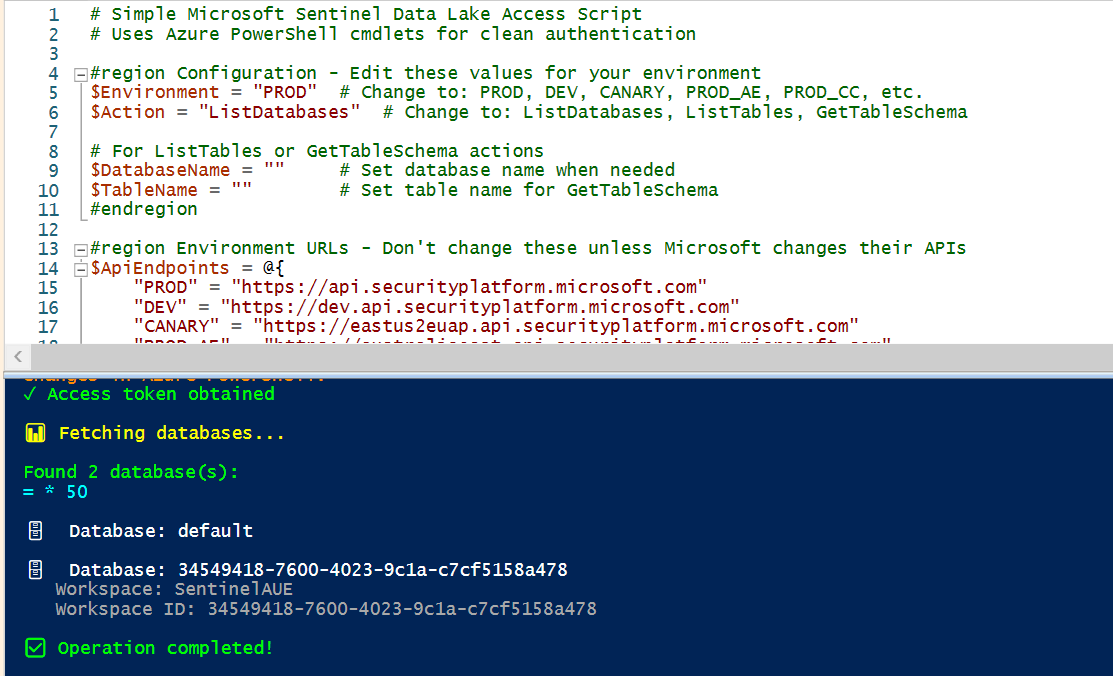
It's early days for the Sentinel Data Lake and Microsoft haven't yet released any information about the APIs that are going to be exposed. For the small number of API calls that can be found, the following PowerShell script can provide some access from PowerShell so we can at least get an idea about authentication!
# Simple Microsoft Sentinel Data Lake Access Script

#region Configuration - Edit these values for your environment
$Environment = "PROD"  # Change to: PROD, DEV, CANARY, PROD_AE, PROD_CC, etc.
$TenantId = $null      # Set your tenant ID here if needed, or leave as $null for common endpoint
$Action = "ListDatabases"  # Change to: ListDatabases, ListTables, GetTableSchema

# For ListTables or GetTableSchema actions
$DatabaseName = ""     # Set database name when needed
$TableName = ""        # Set table name for GetTableSchema
#endregion

#region Environment URLs - Don't change these unless Microsoft changes their APIs
$ApiEndpoints = @{
    "PROD" = "https://api.securityplatform.microsoft.com"
    "DEV" = "https://dev.api.securityplatform.microsoft.com"
    "CANARY" = "https://eastus2euap.api.securityplatform.microsoft.com"
    "PROD_AE" = "https://australiaeast.api.securityplatform.microsoft.com"
    "PROD_CC" = "https://canadacentral.api.securityplatform.microsoft.com"
    "PROD_CUS" = "https://centralus.api.securityplatform.microsoft.com"
    "PROD_EUS" = "https://eastus.api.securityplatform.microsoft.com"
    "PROD_EUS2" = "https://eastus2.api.securityplatform.microsoft.com"
    "PROD_FC" = "https://francecentral.api.securityplatform.microsoft.com"
    "PROD_JPE" = "https://japaneast.api.securityplatform.microsoft.com"
    "PROD_NEU" = "https://northeurope.api.securityplatform.microsoft.com"
    "PROD_SCUS" = "https://southcentralus.api.securityplatform.microsoft.com"
    "PROD_UKS" = "https://uksouth.api.securityplatform.microsoft.com"
    "PROD_WEU" = "https://westeurope.api.securityplatform.microsoft.com"
    "PROD_WUS2" = "https://westus2.api.securityplatform.microsoft.com"
    "NOE" = "https://norwayeast.api.securityplatform.microsoft.com"
}

$ClientId = "4d6257d2-8e40-4f75-8da7-9cc73eab0764"  # Microsoft's Sentinel extension client ID
$Scope = "73c2949e-da2d-457a-9607-fcc665198967/.default"
#endregion

# Get the API base URL
$ApiBase = $ApiEndpoints[$Environment]
if (-not $ApiBase) {
    Write-Host "Invalid environment: $Environment" -ForegroundColor Red
    Write-Host "Valid options: $($ApiEndpoints.Keys -join ', ')" -ForegroundColor Yellow
    exit 1
}

Write-Host "=== Microsoft Sentinel Data Lake Access ===" -ForegroundColor Cyan
Write-Host "Environment: $Environment" -ForegroundColor Green
Write-Host "API Base: $ApiBase" -ForegroundColor Green
Write-Host ""

# Step 1: Get Access Token
Write-Host "Getting access token..." -ForegroundColor Yellow

$Authority = if ($TenantId) { "https://login.microsoftonline.com/$TenantId" } else { "https://login.microsoftonline.com/common" }
$AccessToken = $null

# Try Azure PowerShell first (cleanest method)
try {
    if (Get-Module -ListAvailable -Name "Az.Accounts") {
        Import-Module Az.Accounts -Force
        $Context = Get-AzContext
        if (-not $Context) {
            Write-Host "Connecting to Azure..." -ForegroundColor Yellow
            Connect-AzAccount | Out-Null
        }

        $Token = [Microsoft.Azure.Commands.Common.Authentication.AzureSession]::Instance.AuthenticationFactory.Authenticate(
            $Context.Account, $Context.Environment, $Context.Tenant.Id, $null, $null, $null, $Scope
        ).AccessToken

        $AccessToken = $Token
        Write-Host "✓ Authenticated via Azure PowerShell" -ForegroundColor Green
    }
}
catch {
    Write-Host "Azure PowerShell authentication failed, trying device code..." -ForegroundColor Yellow
}

# Fallback to device code flow
if (-not $AccessToken) {
    try {
        # Start device code flow
        $DeviceCodeBody = @{
            client_id = $ClientId
            scope = $Scope
        } | ConvertTo-Json

        $DeviceCodeResponse = Invoke-RestMethod -Uri "$Authority/oauth2/v2.0/devicecode" -Method Post -Body $DeviceCodeBody -ContentType "application/json"

        Write-Host ""
        Write-Host "=== Authentication Required ===" -ForegroundColor Yellow
        Write-Host "1. Go to: $($DeviceCodeResponse.verification_uri)" -ForegroundColor Cyan
        Write-Host "2. Enter code: $($DeviceCodeResponse.user_code)" -ForegroundColor Green
        Write-Host "3. Sign in with your Microsoft account" -ForegroundColor Cyan
        Write-Host ""
        Write-Host "Waiting for authentication" -ForegroundColor Yellow -NoNewline

        # Poll for token
        $TokenBody = @{
            grant_type = "urn:ietf:params:oauth:grant-type:device_code"
            client_id = $ClientId
            device_code = $DeviceCodeResponse.device_code
        } | ConvertTo-Json

        $Timeout = [DateTime]::Now.AddSeconds($DeviceCodeResponse.expires_in)

        do {
            Start-Sleep -Seconds $DeviceCodeResponse.interval
            Write-Host "." -NoNewline -ForegroundColor Yellow

            try {
                $TokenResponse = Invoke-RestMethod -Uri "$Authority/oauth2/v2.0/token" -Method Post -Body $TokenBody -ContentType "application/json"
                $AccessToken = $TokenResponse.access_token
                Write-Host ""
                Write-Host "✓ Authentication successful!" -ForegroundColor Green
                break
            }
            catch {
                # Keep waiting
            }
        } while ([DateTime]::Now -lt $Timeout)

        if (-not $AccessToken) {
            Write-Host ""
            Write-Host "❌ Authentication timeout" -ForegroundColor Red
            exit 1
        }
    }
    catch {
        Write-Host ""
        Write-Host "❌ Authentication failed: $($_.Exception.Message)" -ForegroundColor Red
        exit 1
    }
}

# Step 2: Set up headers for API calls
$Headers = @{
    'Authorization' = "Bearer $AccessToken"
    'Content-Type' = 'application/json'
}

Write-Host ""

# Step 3: Execute the requested action
switch ($Action) {
    "ListDatabases" {
        Write-Host "📊 Fetching databases..." -ForegroundColor Yellow

        try {
            $Response = Invoke-RestMethod -Uri "$ApiBase/lake/databases?api-version=2024-07-01" -Headers $Headers -Method Get
            $Databases = $Response.value

            Write-Host ""
            Write-Host "Found $($Databases.Count) database(s):" -ForegroundColor Green
            Write-Host "=" * 50 -ForegroundColor Cyan

            foreach ($Database in $Databases) {
                Write-Host ""
                Write-Host "🗄️  Database: $($Database.databaseName)" -ForegroundColor White
                if ($Database.sentinelWorkspace) {
                    Write-Host "   Workspace: $($Database.sentinelWorkspace.name)" -ForegroundColor Gray
                    Write-Host "   Workspace ID: $($Database.sentinelWorkspace.id)" -ForegroundColor Gray
                }
            }
        }
        catch {
            Write-Host "❌ Failed to fetch databases: $($_.Exception.Message)" -ForegroundColor Red
            exit 1
        }
    }

    "ListTables" {
        $Url = "$ApiBase/lake/tables?api-version=2024-05-01-preview"
        if ($DatabaseName) {
            $Url += "&databaseName=$DatabaseName"
            Write-Host "📋 Fetching tables from database: $DatabaseName..." -ForegroundColor Yellow
        } else {
            Write-Host "📋 Fetching all tables..." -ForegroundColor Yellow
        }

        try {
            $AllTables = @()
            $NextUrl = $Url

            do {
                $Response = Invoke-RestMethod -Uri $NextUrl -Headers $Headers -Method Get
                $AllTables += $Response.items
                $NextUrl = $Response.nextLink

                if ($NextUrl) {
                    Write-Host "   Getting more results..." -ForegroundColor Gray
                }
            } while ($NextUrl)

            Write-Host ""
            Write-Host "Found $($AllTables.Count) table(s):" -ForegroundColor Green
            Write-Host "=" * 50 -ForegroundColor Cyan

            foreach ($Table in $AllTables) {
                Write-Host ""
                Write-Host "📊 Table: $($Table.name)" -ForegroundColor White
                Write-Host "   Database: $($Table.databaseName)" -ForegroundColor Gray
                Write-Host "   Type: $($Table.tableType)" -ForegroundColor Gray
                if ($Table.schema) {
                    Write-Host "   Columns: $($Table.schema.Count)" -ForegroundColor Gray
                }
            }
        }
        catch {
            Write-Host "❌ Failed to fetch tables: $($_.Exception.Message)" -ForegroundColor Red
            exit 1
        }
    }

    "GetTableSchema" {
        if (-not $DatabaseName -or -not $TableName) {
            Write-Host "❌ DatabaseName and TableName must be set for GetTableSchema action" -ForegroundColor Red
            Write-Host "Edit the script and set these variables at the top" -ForegroundColor Yellow
            exit 1
        }

        Write-Host "🔍 Getting schema for table: $TableName in database: $DatabaseName..." -ForegroundColor Yellow

        try {
            # Get all tables and find the specific one
            $Url = "$ApiBase/lake/tables?api-version=2024-05-01-preview&databaseName=$DatabaseName"
            $AllTables = @()
            $NextUrl = $Url

            do {
                $Response = Invoke-RestMethod -Uri $NextUrl -Headers $Headers -Method Get
                $AllTables += $Response.items
                $NextUrl = $Response.nextLink
            } while ($NextUrl)

            $Table = $AllTables | Where-Object { $_.name -eq $TableName }

            if (-not $Table) {
                Write-Host "❌ Table '$TableName' not found in database '$DatabaseName'" -ForegroundColor Red
                exit 1
            }

            Write-Host ""
            Write-Host "Schema for table: $TableName" -ForegroundColor Green
            Write-Host "=" * 50 -ForegroundColor Cyan
            Write-Host "Column Name".PadRight(35) + "Data Type" -ForegroundColor White
            Write-Host ("-" * 60) -ForegroundColor Gray

            foreach ($Column in $Table.schema) {
                Write-Host "$($Column.name)".PadRight(35) + "$($Column.type)" -ForegroundColor Gray
            }
        }
        catch {
            Write-Host "❌ Failed to get table schema: $($_.Exception.Message)" -ForegroundColor Red
            exit 1
        }
    }

    default {
        Write-Host "❌ Invalid action: $Action" -ForegroundColor Red
        Write-Host "Valid actions: ListDatabases, ListTables, GetTableSchema" -ForegroundColor Yellow
        exit 1
    }
}

Write-Host ""
Write-Host "✅ Operation completed!" -ForegroundColor Green
Write-Host ""
Write-Host "💡 To change what this script does:" -ForegroundColor Yellow
Write-Host "   1. Edit the variables at the top of the script" -ForegroundColor Gray
Write-Host "   2. Change `$Action to: ListDatabases, ListTables, or GetTableSchema" -ForegroundColor Gray
Write-Host " 3. Set `$DatabaseName and `$TableName when needed" -ForegroundColor Gray- Log in to post comments