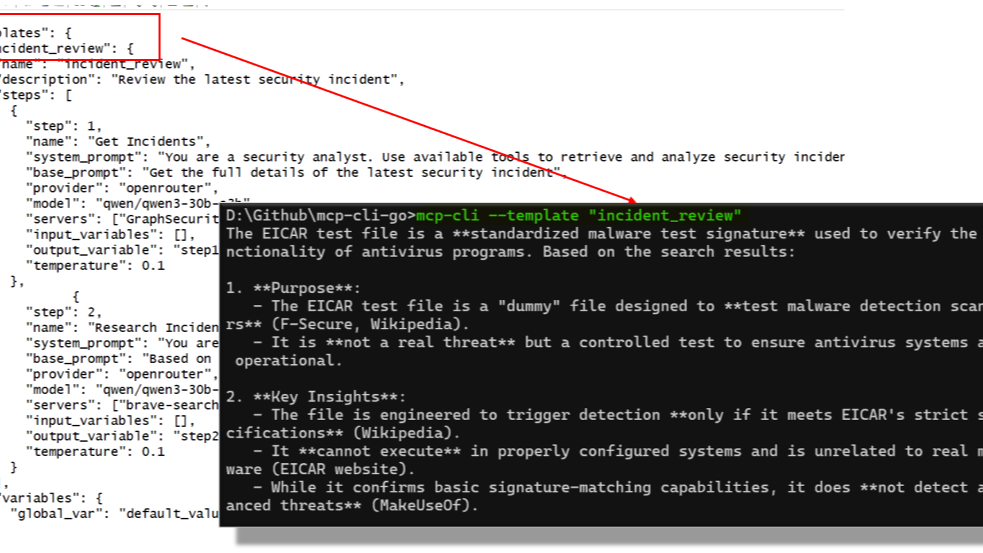
🎯 What It Does
MCP CLI Go is a command-line tool that lets you connect any AI provider (OpenAI, Anthropic, Gemini, Ollama, etc.) to any MCP server through a single executable.
🔧 Why I Built This
The Model Context Protocol is solid - it standardises how AI models interact with external tools and data sources. But most of the existing development focusses on MCP Servers, not MCP Clients that can use those servers. For production automation, I needed something that could:
- Run in scripts, Function Apps, Containers and CI/CD pipelines
- Chain multiple AI operations together with data passing between steps
- Handle different AI providers for different tasks in the same workflow
- Work reliably with proper error handling and retries
- Be agnostic to being hosted on serverless cloud platforms or onprem
⚡ The Workflow System
The core feature is JSON-based workflow templates that define multi-step AI processes within the configuration file:
{
  "analyze_logs": {
    "steps": [
      {
        "step": 1,
        "name": "Read Log File",
        "base_prompt": "Read and summarize: {{file_path}}",
        "servers": ["filesystem"],
        "provider": "gpt-4o",
        "temperature": 0.1,
        "output_variable": "log_summary"
      },
      {
        "step": 2,
        "name": "Find Issues",
        "base_prompt": "Find errors in: {{log_summary}}",
        "provider": "claude",
        "temperature": 0.2,
        "output_variable": "issues"
      },
      {
        "step": 3,
        "name": "Generate Report",
        "base_prompt": "Create incident report: {{issues}}",
        "provider": "gpt-4o",
        "temperature": 0.3
      }
    ]
  }
}
Variables can be referenced between steps, you can use different models for different tasks, and the entire thing is scriptable.
🏗️ Technical Details
Architecture: Clean domain-driven design with interfaces for everything. Adding new AI providers or MCP servers is straightforward.
Provider Support: OpenAI (and compatible APIs), Anthropic Claude, Google Gemini, Ollama for local models, OpenRouter, DeepSeek.
Deployment: Single 13MB binary, no dependencies. Auto-generates example configurations on first run.
Error Handling: Built-in retries, timeout management, and graceful degradation. Designed for production use.
💼 Use Cases I've Tested
- 🔍 Log Analysis: Automated incident detection and report generation
- 📖 Documentation: Multi-step research and content creation workflows
- 🛡️ Security Operations: Threat analysis pipelines combining multiple data sources
- 📊 Data Processing: ETL workflows with AI-powered transformations
- ☁️ Function Apps: Works well in Azure Functions and similar serverless environments
📦 Installation and Usage
# Build from source
git clone https://github.com/LaurieRhodes/mcp-cli-go.git
cd mcp-cli-go
go build -o mcp-cli.exe

# First run creates example config
mcp-cli.exe --list-templates

# Run a workflow
echo "incident_id_123" | ./mcp-cli --template analyze_incident

# Interactive mode
mcp-cli.exe chat --provider anthropic --model claude-3-5-sonnet

# One-shot queries
mcp-cli.exe query "What files are in the current directory?"
⚙️ Configuration
The tool auto-generates a comprehensive configuration file with examples for all supported providers and workflow templates. You just need to add your API keys.
🐹 Why Go?
Go was the right choice for this. Single binary deployment, excellent security, speed and cross-platform support.
🔌 MCP Server Compatibility
Works with any standard MCP server. I've tested it with filesystem servers, database connectors, web search tools, and custom business system integrations.
📂 Source Code
Everything's on GitHub: https://github.com/LaurieRhodes/mcp-cli-go
MIT licensed, comprehensive documentation, and examples included. If you're working with MCP or building AI automation pipelines, take a look.
The README has detailed setup instructions and the docs/ directory covers architecture, provider integration guides, and workflow template examples.
🙏 Acknowledgments
A big thanks has to go to Chris Hay and the team behind the original Python mcp-cli project for their heavy lifting and hard work!
- Log in to post comments