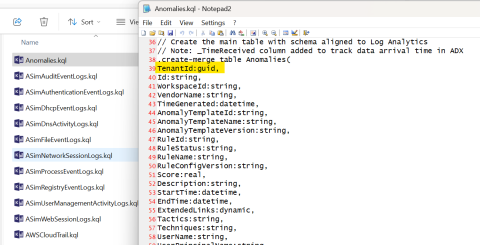
A frustration in dealing with table schemas for Log Analytics and Azure Data Explorer is inaccuracies with Microsoft's published documentation for the schema. The schema returned by using Microsoft's recommended method (https://learn.microsoft.com/en-us/rest/api/loganalytics/schema/get?view=rest-loganalytics-2023-09-01&tabs=HTTP) can mangle data types. This can lead to unexpected difficulties when working with data in a large scale.
I've previously written about retrieving Log Analytics schemas in the post: 'Creating ADX table Schemas for Defender, Entra and Microsoft Sentinel' although that approach only returns one table schema at a time. It's been an extremely useful piece of KQL but there is a more robust approach.
Data Consistency
If we intend to use Azure Data Explorer (ADX) as a Big Data platform for security analytics, we really need to ensure that we get consistency with data types. The getschema api with LogAnalytics is well known for mangling data types and returning guids as strings. Thankfully there is another method for getting Log Analytics schemas in bulk through using the Azure Management APIs.
 # Call Azure Management API
$apiUri = "https://management.azure.com/subscriptions/$subscriptionId/resourcegroups/$resourceGroupName/providers/microsoft.operationalinsights/workspaces/$workspaceName/tables/$tableName" + "?api-version=2023-09-01"
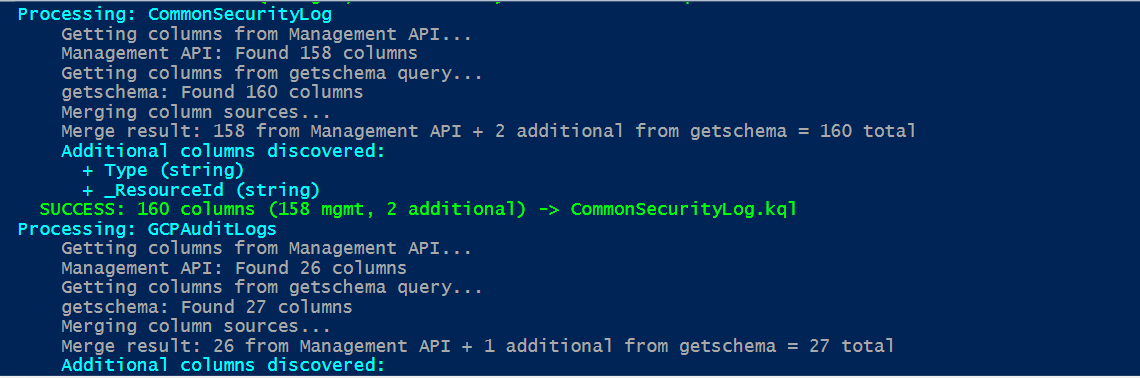
With Azure Management APIs we can at least preserve the correct data types from Log Analytics. However, there are a small number of special field types that don't get exported with that call. We end up having to use both the Azure Management and GetSchema API methods if we really want some certainty of faithful schema export. The script shared in this article uses both methods to create consolidated KQL suitable for creating reliable table schemas in Azure Data Explorer.
Notes on the .KQL output
Each exported Log Analytics table creates a distinct .kql file to be run against your Azure Data Explorer (ADX) database. The examples are optimised for a typical SOC usage.
.create-merge table AWSCloudWatchRaw (records:dynamic)

.alter-merge table AWSCloudWatchRaw policy retention softdelete = 1d

.alter table AWSCloudWatchRaw policy caching hot = 1h
By convention, we create "Raw" tables for receiving the incoming data stream (once Event Hubs have been created and configured). To minimise cost and save capacity we reduce the amount of time these raw messages sit in cache.
We will also create example mappings to tell ADX how to unpack raw event data as its streamed from Event Hubs.
// JSON mapping - choose appropriate option based on data structure
.create-or-alter table AWSCloudWatchRaw ingestion json mapping 'AWSCloudWatchRawMapping' '[{"column":"records","Properties":{"path":"$.records"}}]'
// Alternative for direct events: '[{"column":"records","Properties":{"path":"$"}}]'
This is where data engineering comes in. Each type of event object coming in to Azure Data Explorer (ADX) may be received in a different record structure format. Most Microsoft products will submit records nested under a "records" array structure while other event methods will simply stream a sequence of json objects. Depending on how you are getting / forwarding data to Azure Data Explorer (ADX) you will need to alter the mapping files accordingly. This array vs. non-array data stream will also determine how the raw event messages need to be translated into their proper structure. This data "expand" function does require experimentation to get right but the export generator provides some guidance on the different methods to try.
.create-or-alter function AWSCloudWatchExpand() {
AWSCloudWatchRaw
| mv-expand events = records
// Alternative for non-nested: | extend events = records
| project
TimeGenerated=todatetime(events.TimeGenerated),
TenantId=toguid(events.TenantId),
ExtractedTime=todatetime(events.ExtractedTime),
Message=tostring(events.Message),
SourceSystem=tostring(events.SourceSystem),
Type=tostring(events.Type),
_TimeReceived=todatetime(now())
}
_TimeReceived addition
Every exported table is appended with a _TimeReceived field for ADX use to track exactly when a record is processed. This is extremely important as it allows us to work around one of the biggest failings of data consistency with Sentinel. Almost all detections use TimeReceived for trying to sequence events aross different data tables when TimeReceived is mostly (but not consistently) the time an event was received by Log Analytics. It's prone to latency issues and leaves the SOC without any consistent time sequencing method for analysing events across log sources.
Because we have the ability to fine tune schemas and data in ADX in a way that isn't possible in Sentinel, we can re-map actual event times from all of our data sources so that TimeGenerated is a reliable report on when events actually happened. This is of enormous benefit to the SOC function and allows real AI sequence analysis we can't get with Sentinel data natively.
Azure Data Explorer (Kusto)
Azure Data Explorer provides an incredible data analysis capability for SOC teams that can't be gained from any other product. It's extremely cost effective for anyone to run in a personal sandpit or Enterprise environments to operate in dual Tenant and full H.A. on internal networks. The learning curve for managing schemas and effective ETL on raw data is not high and should be seen as essential skills for the Big Data world we re now in. Using this schema export from Log Analytics it's easy for anyone to get started in using Microsoft's premiere data analytics tool with security data.
PowerShell Export Script for Log Analytics Tables
Save the PowerShell script referenced below and alter the parameters to point to a Sentinel / Log Analytics workspace you wish to export table schemas from. You will need Az cmdlets installed for authentication. Example KQL outputs may also be viewed in the repo.
https://github.com/LaurieRhodes/PUBLIC-Scripts/blob/main/Schema/log-analytics-to-adx-kql-export.ps1
# ============================================================================
# Log Analytics to Azure Data Explorer KQL Export Script
# ============================================================================
# Exports Log Analytics table schemas as KQL scripts for Azure Data Explorer
# Uses hybrid approach combining Management API + getschema for complete coverage
#
# Prerequisites: Az.Accounts, Az.OperationalInsights modules and Azure authentication
# Usage: Update configuration below and run script
# ============================================================================

# ============================================================================
# CONFIGURATION - UPDATE THESE VALUES
# ============================================================================

# Azure Configuration
$workspaceName = '<LogAnalyticsName>'
$resourceGroupName = 'ResourcegroupName'
$subscriptionId = '111111-2222-3333-4444-5555555555'
$tenantId = ''  # Optional - leave empty to use current context

# Tables to export - alter to suit
$tablesToExport = @(
    'Anomalies',
    'ASimAuditEventLogs',
    'ASimAuthenticationEventLogs',
    'ASimDhcpEventLogs',
    'ASimDnsActivityLogs',
    'ASimFileEventLogs',
    'ASimNetworkSessionLogs',
    'ASimProcessEventLogs',
    'ASimRegistryEventLogs',
    'ASimUserManagementActivityLogs',
    'ASimWebSessionLogs',
    'AWSCloudTrail',
    'AWSCloudWatch',
    'AWSGuardDuty',
    'AWSVPCFlow',
    'CommonSecurityLog',
    'GCPAuditLogs',
    'GoogleCloudSCC',
    'SecurityEvent',
    'Syslog',
    'WindowsEvent'
)

# Output directories
$outputDirectory = $PSScriptRoot
$kqlDirectory = Join-Path $outputDirectory "kql"

# ADX Configuration
$rawTableRetention = "1d"
$rawTableCaching = "1h"
$mainTableCaching = "1d"

# Hybrid discovery settings
$useHybridDiscovery = $true
$preferManagementAPITypes = $true

# ============================================================================
# FUNCTIONS
# ============================================================================

$ErrorActionPreference = "Stop"

function Convert-LATypeToADXType {
    param($laType)
    switch ($laType.ToLower()) {
        'string' { return 'string' }
        'datetime' { return 'datetime' }
        'int' { return 'int' }
        'long' { return 'long' }
        'real' { return 'real' }
        'bool' { return 'bool' }
        'boolean' { return 'bool' }
        'dynamic' { return 'dynamic' }
        'guid' { return 'guid' }
        'timespan' { return 'timespan' }
        default { return 'string' }
    }
}

function Get-ADXConversionFunction {
    param($laType)
    switch ($laType.ToLower()) {
        'string' { return 'tostring' }
        'datetime' { return 'todatetime' }
        'int' { return 'toint' }
        'long' { return 'tolong' }
        'real' { return 'toreal' }
        'bool' { return 'tobool' }
        'boolean' { return 'tobool' }
        'dynamic' { return 'todynamic' }
        'guid' { return 'toguid' }
        'timespan' { return 'totimespan' }
        default { return 'tostring' }
    }
}

function Infer-DataTypeFromName {
    param($columnName, $getSchemaType)
    # Only correct well-known GUID fields - be conservative
    if (($columnName -eq "TenantId" -or $columnName -eq "WorkspaceId") -and $getSchemaType -eq "string") {
        return "guid"
    }
    return $getSchemaType
}

function Get-SafeAccessToken {
    param([string]$ResourceUrl)

    # Handle both current and future Az.Accounts versions
    try {
        # Try the future-compatible approach first
        $tokenResult = Get-AzAccessToken -ResourceUrl $ResourceUrl -AsSecureString -ErrorAction SilentlyContinue
        if ($tokenResult) {
            # Convert SecureString to plain text for API calls
            $plainToken = [System.Runtime.InteropServices.Marshal]::PtrToStringAuto([System.Runtime.InteropServices.Marshal]::SecureStringToBSTR($tokenResult.Token))
            return $plainToken
        }
    } catch {
        # AsSecureString parameter doesn't exist in current version, fall back
    }

    # Fall back to current behavior (will work until Az 14.0.0)
    $tokenResult = Get-AzAccessToken -ResourceUrl $ResourceUrl
    return $tokenResult.Token
}

function Get-ManagementAPIColumns {
    param([string]$tableName, [hashtable]$authHeaders, [string]$subscriptionId, [string]$resourceGroupName, [string]$workspaceName)

    try {
        Write-Host "    Getting columns from Management API..." -ForegroundColor Gray
        $apiUri = "https://management.azure.com/subscriptions/$subscriptionId/resourcegroups/$resourceGroupName/providers/microsoft.operationalinsights/workspaces/$workspaceName/tables/$tableName" + "?api-version=2023-09-01"
        $response = Invoke-RestMethod -Method Get -Headers $authHeaders -Uri $apiUri -UseBasicParsing

        $columnDefinitions = @()
        $tableType = "Unknown"
        if ($response.properties.schema.tableType) {
            $tableType = $response.properties.schema.tableType
        }

        if ($response.properties.schema.columns -and $tableType -eq "CustomLog") {
            foreach ($column in $response.properties.schema.columns) {
                $columnDefinitions += @{ name = $column.name; type = $column.type; description = $column.description; source = "ManagementAPI" }
            }
        } else {
            if ($response.properties.schema.standardColumns) {
                foreach ($column in $response.properties.schema.standardColumns) {
                    $columnDefinitions += @{ name = $column.name; type = $column.type; description = $column.description; source = "ManagementAPI" }
                }
            }
            if ($response.properties.schema.customColumns) {
                foreach ($column in $response.properties.schema.customColumns) {
                    $columnDefinitions += @{ name = $column.name; type = $column.type; description = $column.description; source = "ManagementAPI" }
                }
            }
        }

        Write-Host "    Management API: Found $($columnDefinitions.Count) columns" -ForegroundColor Gray
        return @{ columns = $columnDefinitions; tableType = $tableType; success = $true }
    } catch {
        Write-Host "    Management API: ERROR - $($_.Exception.Message)" -ForegroundColor Yellow
        return @{ columns = @(); tableType = "Unknown"; success = $false; error = $_.Exception.Message }
    }
}

function Get-GetSchemaColumns {
    param([string]$tableName, [string]$workspaceGuid, [hashtable]$queryHeaders)

    try {
        Write-Host "    Getting columns from getschema query..." -ForegroundColor Gray
        $kqlQuery = "$tableName | getschema"
        $encodedQuery = [System.Web.HttpUtility]::UrlEncode($kqlQuery)
        $queryUri = "https://api.loganalytics.io/v1/workspaces/$workspaceGuid/query?query=$encodedQuery"
        $response = Invoke-RestMethod -Method Get -Headers $queryHeaders -Uri $queryUri -UseBasicParsing

        $columnDefinitions = @()
        if ($response.tables -and $response.tables[0].rows) {
            foreach ($row in $response.tables[0].rows) {
                $inferredType = Infer-DataTypeFromName -columnName $row[0] -getSchemaType $row[3]
                $columnDefinitions += @{
                    name = $row[0]; type = $inferredType; description = "Discovered via getschema"; source = "GetSchema"
                    ordinal = $row[1]; systemType = $row[2]; originalType = $row[3]
                }
            }
        }

        Write-Host "    getschema: Found $($columnDefinitions.Count) columns" -ForegroundColor Gray
        return @{ columns = $columnDefinitions; success = $true }
    } catch {
        Write-Host "    getschema: ERROR - $($_.Exception.Message)" -ForegroundColor Yellow
        return @{ columns = @(); success = $false; error = $_.Exception.Message }
    }
}

function Merge-ColumnSources {
    param([array]$managementColumns, [array]$getSchemaColumns, [bool]$preferManagementTypes = $true)

    Write-Host "    Merging column sources..." -ForegroundColor Gray
    $mergedColumns = @()
    $managementColumnNames = $managementColumns | ForEach-Object { $_.name }

    foreach ($mgmtCol in $managementColumns) { $mergedColumns += $mgmtCol }

    $addedFromGetSchema = 0
    $addedColumns = @()
    foreach ($schemaCol in $getSchemaColumns) {
        if ($schemaCol.name -notin $managementColumnNames) {
            $mergedColumns += $schemaCol
            $addedFromGetSchema++
            $addedColumns += $schemaCol
        }
    }

    Write-Host "    Merge result: $($managementColumns.Count) from Management API + $addedFromGetSchema additional from getschema = $($mergedColumns.Count) total" -ForegroundColor Gray

    if ($addedFromGetSchema -gt 0) {
        Write-Host "    Additional columns discovered:" -ForegroundColor Cyan
        foreach ($col in $addedColumns) {
            Write-Host "      + $($col.name) ($($col.type))" -ForegroundColor Cyan
        }
    }

    # Return both the merged columns and the count of additional columns
    return @{
        columns = $mergedColumns
        additionalCount = $addedFromGetSchema
    }
}

function Generate-KQLScript {
    param([string]$tableName, [array]$columnDefinitions, [string]$tableType = "Unknown", [bool]$isHybrid = $false)

    $rawTableName = "${tableName}Raw"
    $expandFunctionName = "${tableName}Expand"
    $mappingName = "${tableName}RawMapping"

    # Sort columns following Microsoft's convention:
    # 1. TimeGenerated first
    # 2. Regular columns (alphabetical)
    # 3. Type column (if present)
    # 4. Underscore columns (_ResourceId, etc.)
    # 5. _TimeReceived last (our addition)

    $timeGeneratedCol = $columnDefinitions | Where-Object { $_.name -eq "TimeGenerated" }
    $typeCol = $columnDefinitions | Where-Object { $_.name -eq "Type" }
    $underscoreCols = $columnDefinitions | Where-Object { $_.name -like "_*" } | Sort-Object name
    $regularCols = $columnDefinitions | Where-Object { $_.name -ne "TimeGenerated" -and $_.name -ne "Type" -and $_.name -notlike "_*" } | Sort-Object name

    # Build ordered column list
    $sortedColumns = @()
    if ($timeGeneratedCol) { $sortedColumns += $timeGeneratedCol }
    $sortedColumns += $regularCols
    if ($typeCol) { $sortedColumns += $typeCol }
    $sortedColumns += $underscoreCols

    $mainTableColumns = @()
    $expandProjections = @()

    foreach ($column in $sortedColumns) {
        $adxType = Convert-LATypeToADXType -laType $column.type
        $conversionFunc = Get-ADXConversionFunction -laType $column.type
        $mainTableColumns += "$($column.name):$adxType"
        $expandProjections += "$($column.name)=$conversionFunc(events.$($column.name))"
    }

    # Add _TimeReceived column last
    $mainTableColumns += "_TimeReceived:datetime"
    $expandProjections += "_TimeReceived=todatetime(now())"

    $discoveryComment = if ($isHybrid) { "// Schema discovered using hybrid approach (Management API + getschema)" } else { "// Schema discovered using Management API only" }
    $tableTypeComment = "// Table type: $tableType"

    $kqlScript = @"
// ============================================================================
// Azure Data Explorer KQL Script for $tableName
// ============================================================================
// Generated: $(Get-Date -Format 'yyyy-MM-dd HH:mm:ss')
$tableTypeComment
$discoveryComment
// ============================================================================

.create-merge table $rawTableName (records:dynamic)

.alter-merge table $rawTableName policy retention softdelete = $rawTableRetention

.alter table $rawTableName policy caching hot = $rawTableCaching

// JSON mapping - choose appropriate option based on data structure
.create-or-alter table $rawTableName ingestion json mapping '$mappingName' '[{"column":"records","Properties":{"path":"$.records"}}]'
// Alternative for direct events: '[{"column":"records","Properties":{"path":"$"}}]'

.create-merge table $tableName(
$($mainTableColumns -join ",`n"))

.alter table $tableName policy caching hot = $mainTableCaching

.create-or-alter function $expandFunctionName() {
$rawTableName
| mv-expand events = records
// Alternative for non-nested: | extend events = records
| project
$($expandProjections -join ",`n")
}

.alter table $tableName policy update @'[{"Source": "$rawTableName", "Query": "$expandFunctionName()", "IsEnabled": "True", "IsTransactional": true}]'
"@
    return $kqlScript
}

# ============================================================================
# MAIN EXECUTION
# ============================================================================

Write-Host "Log Analytics to ADX KQL Export Script (Enhanced)" -ForegroundColor Cyan
Write-Host "=================================================" -ForegroundColor Cyan

Write-Host "`nConfiguration:" -ForegroundColor Yellow
Write-Host "  Workspace: $workspaceName"
Write-Host "  Tables to Export: $($tablesToExport.Count)"
Write-Host "  Hybrid Discovery: $useHybridDiscovery"

# Validate and prepare
if (-not $workspaceName -or -not $resourceGroupName -or -not $subscriptionId) {
    throw "ERROR: Configuration values cannot be empty"
}

if (-not (Test-Path $kqlDirectory)) { New-Item -Path $kqlDirectory -ItemType Directory -Force | Out-Null }

# Check modules and authentication
$requiredModules = @('Az.Accounts', 'Az.OperationalInsights')
foreach ($module in $requiredModules) {
    if (-not (Get-Module -ListAvailable -Name $module)) { throw "ERROR: $module module required" }
    if (-not (Get-Module $module)) { Import-Module $module }
}

$context = Get-AzContext
if (-not $context) {
    if ($tenantId) { Connect-AzAccount -TenantId $tenantId | Out-Null } else { Connect-AzAccount | Out-Null }
    $context = Get-AzContext
}

if ($context.Subscription.Id -ne $subscriptionId) {
    Set-AzContext -SubscriptionId $subscriptionId | Out-Null
}

# Get tokens using future-compatible method
Write-Host "`nAcquiring access tokens..." -ForegroundColor Yellow
$managementTokenString = Get-SafeAccessToken -ResourceUrl "https://management.azure.com/"
$managementHeaders = @{ 'Content-Type' = 'application/json'; 'Authorization' = "Bearer $managementTokenString"; 'Accept' = 'application/json' }
Write-Host "SUCCESS: Management API token acquired" -ForegroundColor Green

if ($useHybridDiscovery) {
    $laTokenString = Get-SafeAccessToken -ResourceUrl "https://api.loganalytics.io/"
    $queryHeaders = @{ 'Authorization' = "Bearer $laTokenString"; 'Content-Type' = 'application/json' }
    Write-Host "SUCCESS: Log Analytics API token acquired" -ForegroundColor Green

    $workspace = Get-AzOperationalInsightsWorkspace -ResourceGroupName $resourceGroupName -Name $workspaceName
    $workspaceGuid = $workspace.CustomerId
    Write-Host "SUCCESS: Workspace GUID: $workspaceGuid" -ForegroundColor Green
}

# Export KQL scripts
Write-Host "`nGenerating KQL scripts..." -ForegroundColor Yellow
$exportResults = @()
$successCount = 0

foreach ($tableName in $tablesToExport) {
    try {
        Write-Host "Processing: $tableName" -ForegroundColor Cyan

        $managementResult = Get-ManagementAPIColumns -tableName $tableName -authHeaders $managementHeaders -subscriptionId $subscriptionId -resourceGroupName $resourceGroupName -workspaceName $workspaceName

        $getSchemaResult = @{ columns = @(); success = $false }
        if ($useHybridDiscovery -and $managementResult.success) {
            $getSchemaResult = Get-GetSchemaColumns -tableName $tableName -workspaceGuid $workspaceGuid -queryHeaders $queryHeaders
        }

        if ($managementResult.success) {
            if ($useHybridDiscovery -and $getSchemaResult.success) {
                # Hybrid approach: merge both sources
                $mergeResult = Merge-ColumnSources -managementColumns $managementResult.columns -getSchemaColumns $getSchemaResult.columns -preferManagementTypes $preferManagementAPITypes
                $finalColumns = $mergeResult.columns
                $actualAdditionalCount = $mergeResult.additionalCount
                $discoveryMethod = "Hybrid"
            } else {
                # Management API only
                $finalColumns = $managementResult.columns
                $actualAdditionalCount = 0
                $discoveryMethod = "Management API only"
            }
            $tableType = $managementResult.tableType
        } else {
            throw "Management API failed for table: $tableName"
        }

        if ($finalColumns.Count -eq 0) { throw "No columns found" }

        $mgmtCount = ($finalColumns | Where-Object { $_.source -eq "ManagementAPI" }).Count
        $schemaCount = $actualAdditionalCount  # Use the actual additional count, not total getschema count

        $kqlScript = Generate-KQLScript -tableName $tableName -columnDefinitions $finalColumns -tableType $tableType -isHybrid $useHybridDiscovery
        $kqlFile = Join-Path $kqlDirectory "$tableName.kql"
        $kqlScript | Out-File -FilePath $kqlFile -Encoding UTF8 -Force

        Write-Host "  SUCCESS: $($finalColumns.Count) columns ($mgmtCount mgmt, $schemaCount additional) -> $tableName.kql" -ForegroundColor Green

        $exportResults += [PSCustomObject]@{
            TableName = $tableName; ColumnCount = $finalColumns.Count; ManagementAPICount = $mgmtCount
            GetSchemaCount = $schemaCount; TableType = $tableType; Status = "Success"
        }
        $successCount++

    } catch {
        Write-Host "  ERROR: $($_.Exception.Message)" -ForegroundColor Red
        $exportResults += [PSCustomObject]@{ TableName = $tableName; Status = "Failed"; Error = $_.Exception.Message; GetSchemaCount = 0 }
    }
}

# Summary
Write-Host "`nExport Summary:" -ForegroundColor Magenta
Write-Host "SUCCESS: $successCount/$($tablesToExport.Count) tables exported" -ForegroundColor Green
$totalDiscovered = ($exportResults | Where-Object { $_.Status -eq "Success" } | ForEach-Object { $_.GetSchemaCount } | Measure-Object -Sum).Sum
Write-Host "Additional columns discovered: $totalDiscovered" -ForegroundColor Cyan

Write-Host "`nFiles created in kql\ directory. Run scripts in ADX to create tables." -ForegroundColor White
- Log in to post comments