In a previous example, I gave an example of running a simple Service Management Automation runbook using REST. This blog demonstrates how to retrieve output from a called runbook by using platform independent REST calls against the SMA Server.
Four steps exist in obtaining the output from an SMA Runbook:
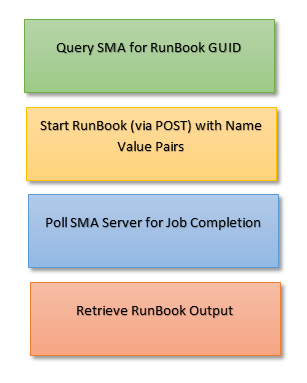
The code below uses PowerShell to shows the four steps required in retrieving SMA output (although the REST calls would be the same in any programming language).
[[powershell]]
# Create a Credentials object
$credentials = New-Object System.Management.Automation.PSCredential ("domain\username",(ConvertTo-SecureString "Password" -AsPlainText -Force))

#--------------
# Step 1. Query the SMA server for the Runbook GUID

$RunbookName =
$URI =  "https://smaserver.domain.com:9090/00000000-0000-0000-0000-000000000000/Runbooks()?`$filter=RunbookName eq 'runbookparametersexample'"
$Response = Invoke-RestMethod -Uri $URI  -Method Get -Credential $credentials

$StartGUIDURI = $Response.id

#--------------
# Step 2. Start the runbook with Name Value pairs for inputs
# * All REST inputs for SMA are as Name Value pairs submitted
# as JSON

$URI =  “$($StartGUIDURI)/Start”
$Headers = @{“Accept” = “application/atom+xml,application/xml”}
$Body = @"
{"parameters":[
{"__metadata":{"type":"Orchestrator.ResourceModel.NameValuePair"},"Name":"FirstName","Value":"Fred"},
{"__metadata":{"type":"Orchestrator.ResourceModel.NameValuePair"},"Name":"LastName","Value":"Flintstone"}
]}
"@

$Response = Invoke-RestMethod -Uri $URI -Body $Body -Method Post -Headers $Headers -Credential $credentials -ContentType  “application/json;odata=verbose”
$JobGUID = $Response.Start.'#text'
"JOB Id =$($JobGUID)"

#-----------------------
#Retrieve the status of the submitted job
# Keep polling until the job status is complete

$URI =  "https://smaserver.domain.com:9090/00000000-0000-0000-0000-000000000000/Jobs(guid'" + $JobGUID  + "')"
$Response = Invoke-RestMethod -Uri $URI  -Method Get -Credential $credentials
$JobStatus = $Response.entry.properties.JobStatus


$Status = (Invoke-RestMethod -Uri $URI  -Method Get -Credential $credentials ).entry.properties.JobStatus
 while ($Status -ne "Completed") {
   "Status = $($Status)"
   Start-Sleep 5
   $Status = (Invoke-RestMethod -Uri $URI  -Method Get -Credential $credentials ).entry.properties.JobStatus

  }

# --------------------------
# Retrieve the output streams from the Job
$URI =   "https://smaserver.domain.com:9090/00000000-0000-0000-0000-000000000000/JobStreams/GetStreamItems?jobId='" + $JobGUID +"'&streamType='Any' "
$Result = Invoke-RestMethod -Uri $URI  -Method Get -Credential $credentials

"StreamText = $($Result.content.properties.StreamText.InnerText)"

[[/powershell]]
Retrieving SMA output with PowerShell CMDlets
Windows hosted processes can use PowerShell CMDlets to start a runbook and retrieve the results. Cmdlets simplify the process by removing the initial step of retrieving a runbook GUID as the Start-SMARunbook activity can resolve runbook names to GUIDs automatically. The cmdlet based code below is the equivalent of the REST orientated “longhand” above.
[[powershell]]
# Create a Credentials object
$credentials = New-Object System.Management.Automation.PSCredential ("domain\username",(ConvertTo-SecureString "Password" -AsPlainText -Force))

# Start a Runbook Job
$JobResult = Start-SmaRunbook -WebServiceEndpoint https://smaserver.domain.com -Port 9090 -Name "runbookparametersexample" -Credential $credentials -Parameters @{"FirstName"="Fred";"LastName"="Flintstone" }
"Job Result $($JobResult)"
Get-SmaJob -Id $JobResult -WebServiceEndpoint https://smaserver.domain.com -Port 9090 -Credential $credentials;

#Poll the status of the started Job
$Status = (Get-SmaJob -Id $JobResult -WebServiceEndpoint https://smaserver.domain.com -Port 9090 -Credential $credentials).JobStatus
 while ($Status -ne "Completed") {
   Start-Sleep 5
   $Status = (Get-SmaJob -Id $JobResult -WebServiceEndpoint https://smaserver.domain.com -Port 9090 -Credential $credentials).JobStatus
  "Status = $($Status)"
  }

# Different streams are accessible from the SMA Job - this example uses the 'any' stream
# but Error, Output & Warning streams may be more appropriate depending on the
# code being written

"Any Stream = "
Get-SmaJobOutput -Id $JobResult -WebServiceEndpoint https://smaserver.domain.com -Port 9090 -Stream Any -Credential $credentials;

[[/powershell]]
See also:
Christopher Keyaert has made some useful modifications to this example - check out his reworked version of the script here: :)
- Log in to post comments
- Log in to post comments
Ignoring Self Signed Certificates